.png)

CircuitSpark Level 2 – IoT Creator is an intermediate course designed for students who want to explore Internet of Things (IoT) technology and smart device development.
In this course, students will learn how electronic devices can connect to the internet, communicate with other devices, and create smart automation systems.
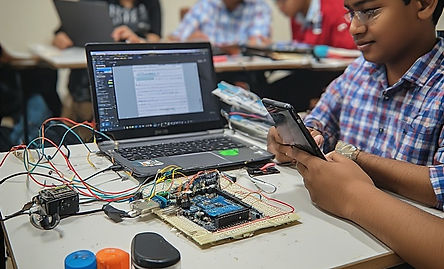
Students will work with WiFi-enabled microcontrollers, sensors, and IoT platforms while building practical projects.
What Students Will Learn
• Introduction to IoT (Internet of Things)
• WiFi communication basics
• ESP8266 microcontroller basics
• Connecting sensors to IoT devices
• Remote monitoring and control systems
• IoT project development
Learning Method
CircuitSpark follows a practical learning approach:
Learn → Simulate → Build → Experiment
Students first understand the concept, then simulate circuits, build real projects, and experiment with new ideas.
IoT Projects
During the course, students will build 20+ beginner-level IoT projects while learning important concepts step by step.
Example Projects
• WiFi LED Control
• IoT Temperature Monitoring System
• Mobile Controlled Device
• Smart Light Automation
• IoT Sensor Monitoring
• Wireless Alert System
• Home Automation Basics
• IoT Data Monitoring
• Remote Control Electronics
• Mini IoT Project
.png)
These projects help students understand IoT fundamentals,
ESP8266 basics, and simple automation systems.
CircuitSpark Level 3 – Class Plan (20 Classes)
Class 1 – Introduction to IoT & Smart Devices
Class 2 – IoT Architecture & Real World Applications
Class 3 – Introduction to ESP8266 Microcontroller
Class 4 – ESP8266 Programming Basics
Class 5 – LED Control using ESP8266
Class 6 – WiFi Connection & Network Setup
Class 7 – Web-Based LED Control
Class 8 – Button Controlled IoT Device
Class 9 – Sensor Basics for IoT
Class 10 – Temperature Sensor Monitoring
Class 11 – IoT Data Transmission
Class 12 – Cloud-Based Data Monitoring
Class 13 – IoT Automation System
Class 14 – Smart Light Automation Project
Class 15 – IoT Alert & Notification System
Class 16 – Wireless Sensor Monitoring
Class 17 – Home Automation Basics
Class 18 – IoT Dashboard Monitoring
Class 19 – Mini IoT Project Development
Class 20 – Final IoT Project Presentation & Assessment
Parent Instructions
Parents are requested to follow the instructions below during the course to ensure a safe and effective
learning experience for students.
1. Parent Supervision
For younger students, a parent or guardian should be nearby during practical sessions, especially when students are building circuits.
2. Safe Learning Environment
Students should attend classes in a safe and comfortable workspace with proper lighting and enough desk space for electronics components.
3. Use Only Course Components
Students should use only the components provided in the CircuitSpark kit and follow the instructor’s instructions while building circuits.
4. Device Requirements
Students should attend classes using a laptop or desktop computer with a stable internet connection.
5. Follow Instructor Guidance
Students must follow the instructor’s instructions carefully while connecting circuits and using electronic components.
Safety Guidelines
Low Voltage Learning
All projects are designed using low-voltage components suitable for students, ensuring safe learning conditions.
Avoid Improper Connections
Students should not connect components directly to power sources without guidance.
Handle Components Carefully
Electronic components should be handled carefully to avoid damage or incorrect wiring.
Stop If Unsure
If a student is unsure about a connection, they should stop and ask the instructor before proceeding.
Important Notice
CircuitSpark encourages parent supervision during practical activities to ensure safe learning and proper guidance for students.